Maintenance Tracker
Schedule and track maintenance tasks to keep your printers running reliably.

Overview
The maintenance tracker helps you:
- Schedule recurring maintenance tasks
- Track when maintenance was last performed
- Get notified when maintenance is due
- Log maintenance history
Maintenance Types
Default Types
Bambuddy includes common maintenance tasks:
| Type | Default Interval | Applies To |
|---|---|---|
| Clean Build Plate | Every 25 hours | All printers |
| Clean Nozzle/Hotend | Every 100 hours | All printers |
| Check Belt Tension | Every 200 hours | All printers |
| Check PTFE Tube | Every 500 hours | All printers |
| Lubricate Carbon Rods | Every 50 hours | X1/P1 |
| Clean Carbon Rods | Every 100 hours | X1/P1 |
| Lubricate Steel Rods | Every 50 hours | P2S |
| Clean Steel Rods | Every 100 hours | P2S |
| Lubricate Linear Rails | Every 50 hours | A1/H2D |
| Clean Linear Rails | Every 100 hours | A1/H2D |
Hiding Default Types
If a default maintenance type isn't relevant to your setup, you can remove it:
- Go to Settings > Maintenance
- Click the icon next to the default type
- Confirm deletion
Hidden default types can be restored at any time — click Restore Default Tasks to bring them all back.
Custom Types
Create your own maintenance tasks:
- Go to Settings > Maintenance
- Click Add Maintenance Type
- Enter name and description
- Set default interval
- Click Save
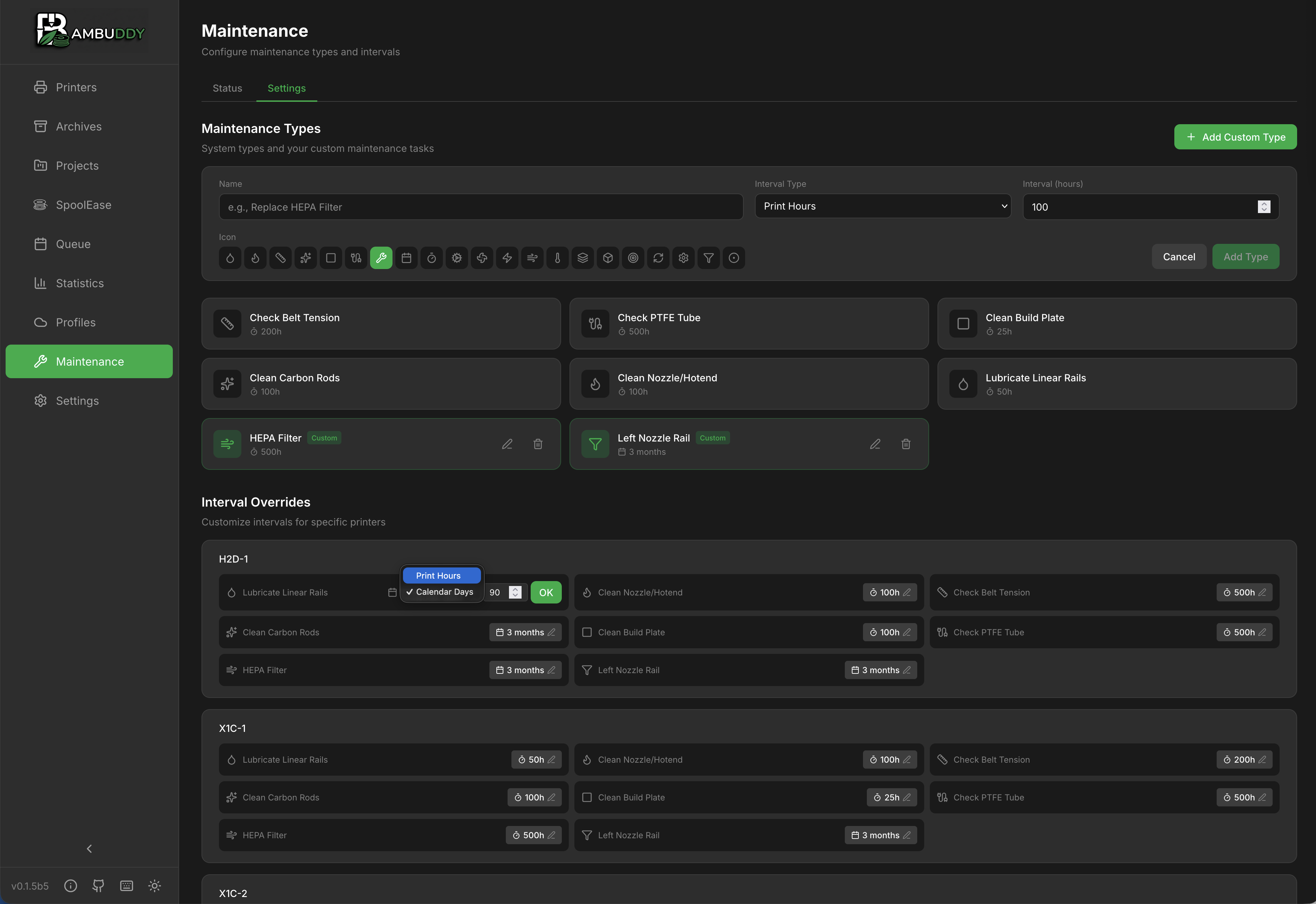
Interval Types
Print Hours
Schedule based on actual print time:
- Example: Lubricate every 100 hours
- Accumulated from print durations
Calendar Days
Schedule based on calendar time:
- Example: Check belts every 30 days
- Counts calendar days regardless of usage
Setting Up Maintenance
Per-Printer Configuration
Each printer has its own maintenance schedule:
- Go to Maintenance page
- Select your printer
- Click Configure
- Enable/disable maintenance types
- Adjust intervals as needed
- Click Save
Interval Customization
Override default intervals per printer:
| Printer | Clean Build Plate |
|---|---|
| Workshop X1C | Every 25 hours |
| Office P1S | Every 15 hours |
| Garage A1 | Every 50 hours |
Logging Maintenance
Marking Complete
When you perform maintenance:
- Go to Maintenance page
- Find the due/overdue item
- Click Mark Complete
- Optionally add notes
- Counter resets
Logging Details
Add information to maintenance logs:
| Field | Description |
|---|---|
| Date | When performed |
| Notes | What you did |
| Parts | Any parts replaced |
Due Status
Status Indicators
| Status | Meaning |
|---|---|
| OK | Not due yet |
| Due Soon | Approaching due |
| Overdue | Past due |
Due Soon Threshold
Configure when "Due Soon" triggers:
- Default: 80% of interval
- Example: Clean Build Plate every 25 hours → "Due Soon" at 20 hours
Notifications
Get notified when maintenance is due:
- Go to Settings > Notifications
- Enable Maintenance Due event
- Configure your notification provider
Notification Timing
- Due Soon: When threshold reached
- Overdue: When interval exceeded
Maintenance History
View past maintenance for each printer:
History Log
| Date | Type | Notes |
|---|---|---|
| Dec 14 | Clean Build Plate | IPA wipe |
| Dec 10 | Lubricate Carbon Rods | Rails and screws |
| Dec 1 | Clean Nozzle/Hotend | Replaced with 0.4mm |
Exporting History
Export maintenance logs for records:
- CSV format
- Date range selection
- Per-printer or all printers
Per-Printer View
Dashboard
Each printer shows maintenance status:
Workshop X1C
─────────────────────────────
✅ Clean Build Plate     12 hours until due
⚠️ Lubricate Carbon Rods  8 hours until due
❌ Check Belt Tension    OVERDUE
✅ Clean Nozzle/Hotend   65 hours until due
Quick Actions
- View Details: See full maintenance info
- Mark Complete: Log completed maintenance
- View History: See past maintenance
Maintenance Tips
Bed Cleaning
Clean with IPA between prints for best adhesion. Deep clean with dish soap weekly.
Lubrication
Use appropriate grease for linear rails. Don't over-lubricate.
Belt Tension
Belts should be firm but not overly tight. Use the "guitar string" test.
Nozzle Inspection
Check for wear, especially with abrasive filaments. Replace when worn.
Filters
HEPA and carbon filters lose effectiveness over time. Replace as recommended.
Document Everything
Add notes when logging maintenance to build a history of what works.
Best Practices
Regular Schedule
- Check maintenance status weekly
- Don't skip overdue items
- Build maintenance into your routine
Preventive vs Reactive
- Preventive: Follow intervals
- Reactive: Fix when broken
- Preventive is better!
Track Everything
- Log all maintenance
- Note any issues found
- Track parts replaced