Projects
Group related prints into projects to track multi-part builds, gift sets, or any collection of related prints.

What Are Projects?
Projects let you:
- Group prints - Organize related archives together
- Track progress - See completion status
- Set targets - Define how many items needed
- Track quantities - Count items per print for batch printing
- Bill of materials - Track sourced parts (screws, electronics)
- File attachments - Store documentation and references
- Cost tracking - Budget and expense tracking
- Color code - Visual identification
- Add notes - Document the project
Use Cases
| Project | Description |
|---|---|
| Voron Build | All parts for a Voron printer |
| Gift Set | Prints for a birthday gift |
| Home Organizers | Kitchen and bathroom organizers |
| Prototypes | Iterations of a design |
| Commission | Client order tracking |
Creating a Project
- Go to the Projects page
- Click New Project
- Fill in the details:
| Field | Description |
|---|---|
| Name | Project name (required) |
| Description | What the project is for |
| Color | Badge color for identification |
| Target Plates | Number of print jobs needed |
| Target Parts | Total number of parts/objects needed |
- Click Create
Plates vs Parts
- Plates = Number of print jobs (each time you click print)
- Parts = Total objects printed (can be multiple per plate)
Example: A Voron build might need 25 plates to print 150 parts total.
Adding Archives to Projects
From Archive Card
- Right-click an archive card
- Select Add to Project
- Choose the project
- Archive is linked
From Archive Details
- Open an archive
- Click the Project dropdown
- Select a project
- Changes save automatically
Bulk Assignment
Assign multiple archives at once using the multi-select toolbar:
- Click Select button (or Shift+click / Ctrl+click archives)
- Select the archives you want to assign
- Click the Project button in the bottom toolbar
- Choose a project from the list
- All selected archives are assigned instantly
Remove from Project
The same modal has a "Remove from project" option to unassign archives in bulk.
Progress Tracking
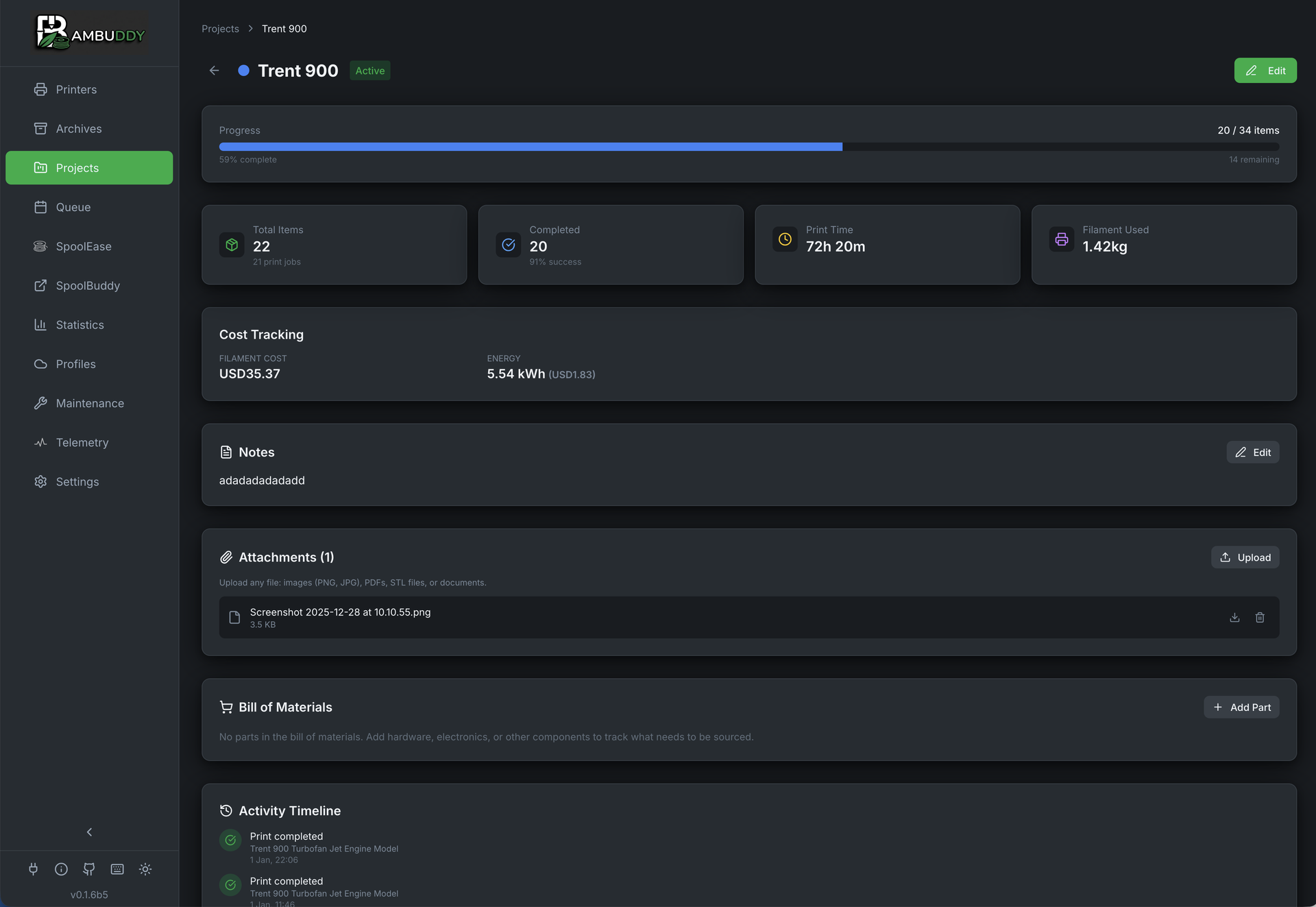
Track how close you are to completing a project with separate progress for plates and parts:
Dual Progress Bars
When you set both target plates and target parts, you'll see two progress bars:
Plates Progress
[████████░░░░░░░░░░░░] 40%
2 of 5 print jobs

Parts Progress
[████████░░░░░░░░░░░░] 40%
10 of 25 parts
Progress States
| State | Description |
|---|---|
| Not started (0%) | |
| In progress | |
| Complete (100%) |
Plates Progress
Tracks the number of print jobs completed:
- Plates Target: 5 with 2 prints done = 40%
- Based on archive count (not quantities)
Parts Progress
Tracks the total number of parts/objects printed:
- Parts Target: 25 with 10 parts printed = 40%
- Sum of all archive quantities
Auto-Detection from 3MF
When a print is archived, BamBuddy automatically detects how many parts/objects were on the plate:
- Reads
slice_info.configfrom the 3MF file - Counts non-skipped objects
- Sets the archive quantity automatically
Auto-Detection Example
You print a plate with 4 copies of a bracket:
- BamBuddy detects 4 objects in the 3MF
- Archive quantity is set to 4 automatically
- Project parts count increases by 4
Manual Quantity Override
You can still manually adjust the quantity:
- Open the archive in edit mode
- Set Items Printed to the correct number
- Project progress updates automatically
Updating Existing Archives
If you have existing archives with quantity=1, run the migration script:
# Preview changes
python scripts/update_archive_quantities.py --dry-run

# Apply changes
python scripts/update_archive_quantities.py
This re-parses all 3MF files to extract the correct object counts.
Color Coding
Each project has a color-coded badge:
Available Colors
- Red
- Orange
- Yellow
- Green
- Blue
- Purple
- Gray
Badge Display
Project badges appear on:
- Archive cards
- Archive list view
- Project overview
Project Cards
Each project displays as a card with plates and parts stats:
┌────────────────────────────────────────┐
│  [Color] Voron Build          150/200  │
│                                parts   │
│  Building a Voron 2.4r2 printer       │
│                                        │
│  Plates [████████░░░░] 40%            │
│  20/50 print jobs                      │
│                                        │
│  Parts  [████████████░░░] 75%         │
│  150/200 parts                         │
│                                        │
│  📦 20 plates  🎯 150 parts            │
└────────────────────────────────────────┘
Card Information
- Color badge - Visual identification
- Name - Project title
- Progress badge - Parts completed / target
- Plates progress - Print jobs completed
- Parts progress - Objects printed
- Stats footer - Quick view of plates and parts count
Editing Projects
- Click the edit icon on a project card
- Modify any field
- Click Save
Editable Fields
- Name
- Description
- Color
- Target Plates (print jobs)
- Target Parts (objects)
Filtering by Project
Filter archives to show only those in a project:
- Go to Archives page
- Click the Project filter
- Select a project
- Only linked archives are shown
Deleting Projects
Deleting a project:
- Click the delete icon on a project card
- Confirm deletion
Archives Preserved
Deleting a project does NOT delete the archives. They remain in your archive but are no longer linked to a project.
Import & Export
Share projects between Bambuddy instances or backup your project data.
Exporting a Single Project (ZIP)
Export a complete project bundle including all files from linked library folders:
- Open the project detail page
- Click the Export button
- A ZIP file is downloaded containing:
project.json- Project settings, BOM items, and folder metadatafiles/- All files from linked library folders
Complete Bundles
ZIP export includes the actual 3MF/gcode files from linked folders, making it easy to share complete project bundles.
Exporting All Projects (JSON)
Export all projects as metadata only (no files):
- Go to the Projects page
- Click the Export button in the header
- A JSON file is downloaded with all project metadata
Metadata Only
Bulk export is JSON format without files. Use single-project ZIP export if you need the files.
Importing Projects
Import projects from ZIP or JSON files:
- Go to the Projects page
- Click the Import button
- Select a
.zipor.jsonfile
ZIP Import:
- Creates the project with all settings
- Creates linked library folders
- Extracts and stores all files from the ZIP
- Files are available in File Manager
JSON Import:
- Creates the project with all settings
- Creates empty linked folders (names only)
- Supports single project or batch import (array of projects)
Use Cases
- Share project templates - Export a project setup for others to use
- Migrate instances - Move projects between Bambuddy servers
- Backup projects - Archive important project bundles with all files
- Collaborate - Share complete project bundles with team members
Project Archives View
Click a project card to see all its archives:
- Grid view of all linked prints
- Same filtering and sorting as main Archives
- Quick access to add more prints
Bill of Materials
Track non-printed parts needed for your project (screws, electronics, hardware):
Adding BOM Items
- Open a project
- Scroll to Bill of Materials
- Click Add Item
- Fill in the details:
| Field | Description |
|---|---|
| Name | Part name (e.g., "M3x8 SHCS") |
| Quantity | How many needed |
| Unit Price | Cost per item |
| Sourcing URL | Where to buy |
| Remarks | Additional notes |
Tracking Acquisition
- Check the box when a part is acquired
- Progress bar shows acquired/total items
- Use Hide done to focus on remaining items
File Attachments
Attach reference files to your project:
Supported File Types
| Category | Extensions |
|---|---|
| Images | JPG, PNG, GIF, WebP, SVG |
| Documents | PDF, DOC, DOCX, TXT, MD |
| 3D Files | STL, OBJ, 3MF, STEP, F3D, SCAD |
| Archives | ZIP, RAR, 7Z, TAR, GZ |
| Scripts/Configs | PY, SH, CFG, GCODE, INI |
| Data | JSON, XML, YAML |
Uploading Files
- Open a project
- Scroll to Attachments
- Click Upload or drag and drop
- Files are stored with the project
Cost Tracking
Track project expenses:
Cost Categories
- Parts cost - Sum of BOM item prices
- Additional costs - Manual entries for other expenses
Currency
Uses your configured currency from Settings → General.
Project Ideas
Multi-Part Prints
Create a project for complex models that print in multiple pieces. Track which parts are done.
Gift Planning
Start a project before a birthday or holiday. Add prints as you complete them.
Printer Builds
Building a Voron, Trident, or other kit? Track every printed part.
Iterative Design
Group prototypes of the same design to see your progression.
Client Orders
Track prints for commission work or client requests.